
Headphones, pitch, volume modes and price alerts
Separate bid/ask audio and tune how market activity becomes sound.
Buttons & settings
Squawk settings → Headphones / Trade sounds
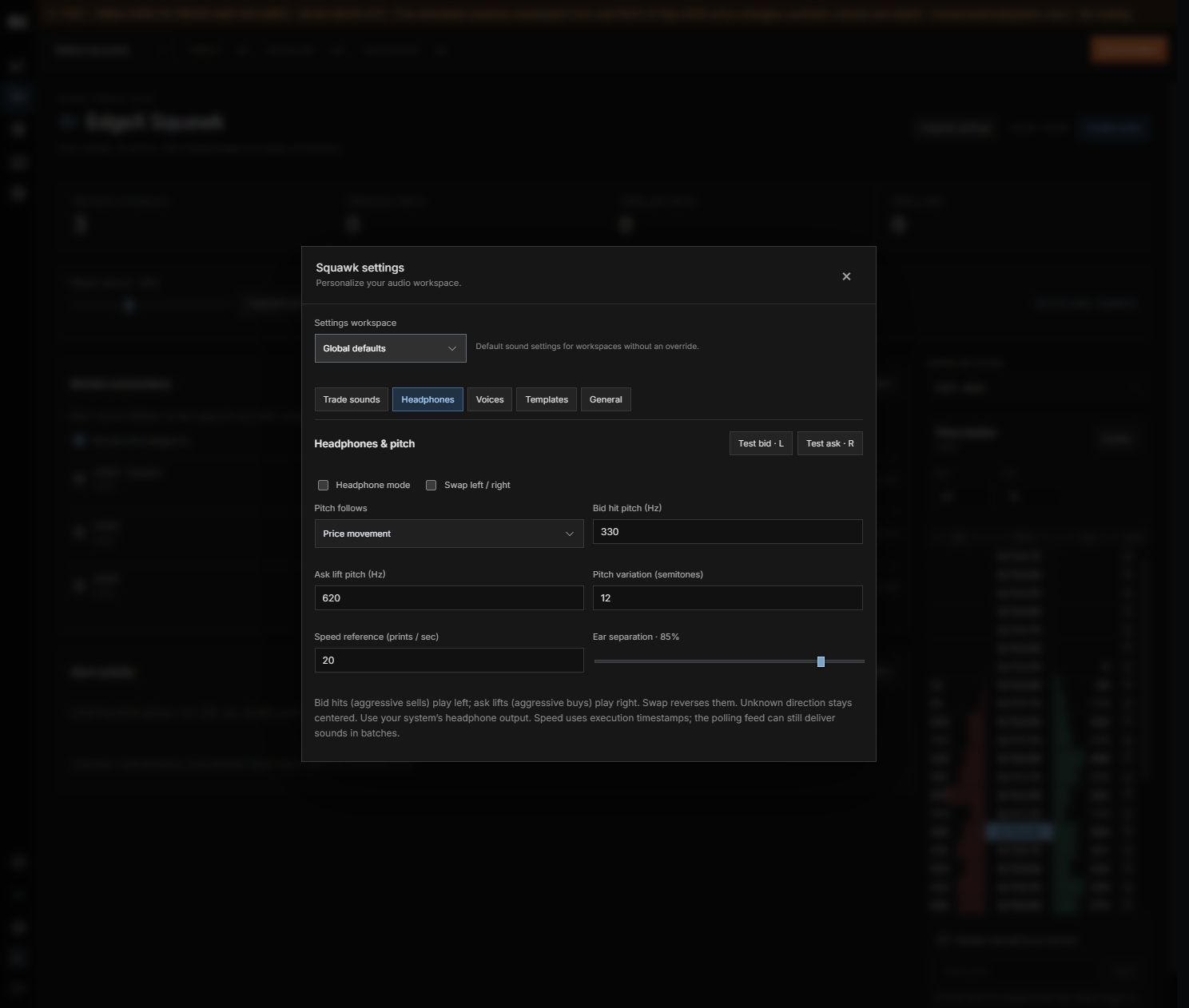
01Headphone mode
What it does
Enable spatial bid/ask playback.
How to use it
Use the headphone output selected in your operating system.
02Test bid · L / Test ask · R
What it does
Preview side-specific sound.
How to use it
Bid hits are aggressive sells; ask lifts are aggressive buys.
03Swap left / right
What it does
Reverse stereo routing.
How to use it
Unknown direction stays centered.
04Pitch follows
What it does
Choose price, volume, prints per second or fixed tones.
How to use it
The speed calculation uses execution timestamps.
05Bid hit / Ask lift pitch
What it does
Set each side’s base frequency in Hz.
How to use it
Test before enabling continuous playback.
06Pitch variation
What it does
Set the pitch range in semitones.
How to use it
Does not alter execution classification.
07Speed reference
What it does
Set the prints-per-second reference.
How to use it
Applies to speed-based pitch.
08Ear separation
What it does
Control stereo width.
How to use it
Zero centers the output; larger values separate the sides.
09Volume calculation
What it does
Choose trade, rolling time, price, adaptive, nearby, captured profile or relative profile.
How to use it
Profile accumulation begins with monitoring.
10Minimum / Large trade size
What it does
Filter small events and identify larger prints.
How to use it
Thresholds are instrument-dependent.
11Sound interval / Alert cooldown
What it does
Limit the frequency of sounds and alerts.
How to use it
Increase if announcements overlap.
12Price ladder alerts
What it does
Enable an alert at a price or add a level.
How to use it
Crossings trigger notifications; they do not place orders.
Stereo routing
In Headphones, enable headphone mode. Bid hits (aggressive sells) play left and ask lifts (aggressive buys) play right; Swap reverses this. Unknown direction remains centered. Use Test bid and Test ask, and choose your headphone output in the operating system.
Pitch and thresholds
Pitch can follow price, execution volume, prints per second or fixed bid/ask tones. Set base frequencies, variation and ear separation. Trade sounds provides minimum size, large-trade threshold, sound interval and alert cooldown.
Volume calculation and ladder alerts
Available modes include individual trades, rolling time, volume at price, adaptive intensity, nearby price volume, captured profile and relative profile. Profile modes accumulate from monitoring start. Use the Squawk ladder to configure price alerts for its selected workspace.
Still need a hand?
Get in touch with the EdgeX team.