
Order-flow plugins: signals, thresholds and evidence
Set up detectors and interpret candidates without confusing them with confirmed orders.
Buttons & settings
Heatmap → Plugins → Signals / Thresholds / Activity
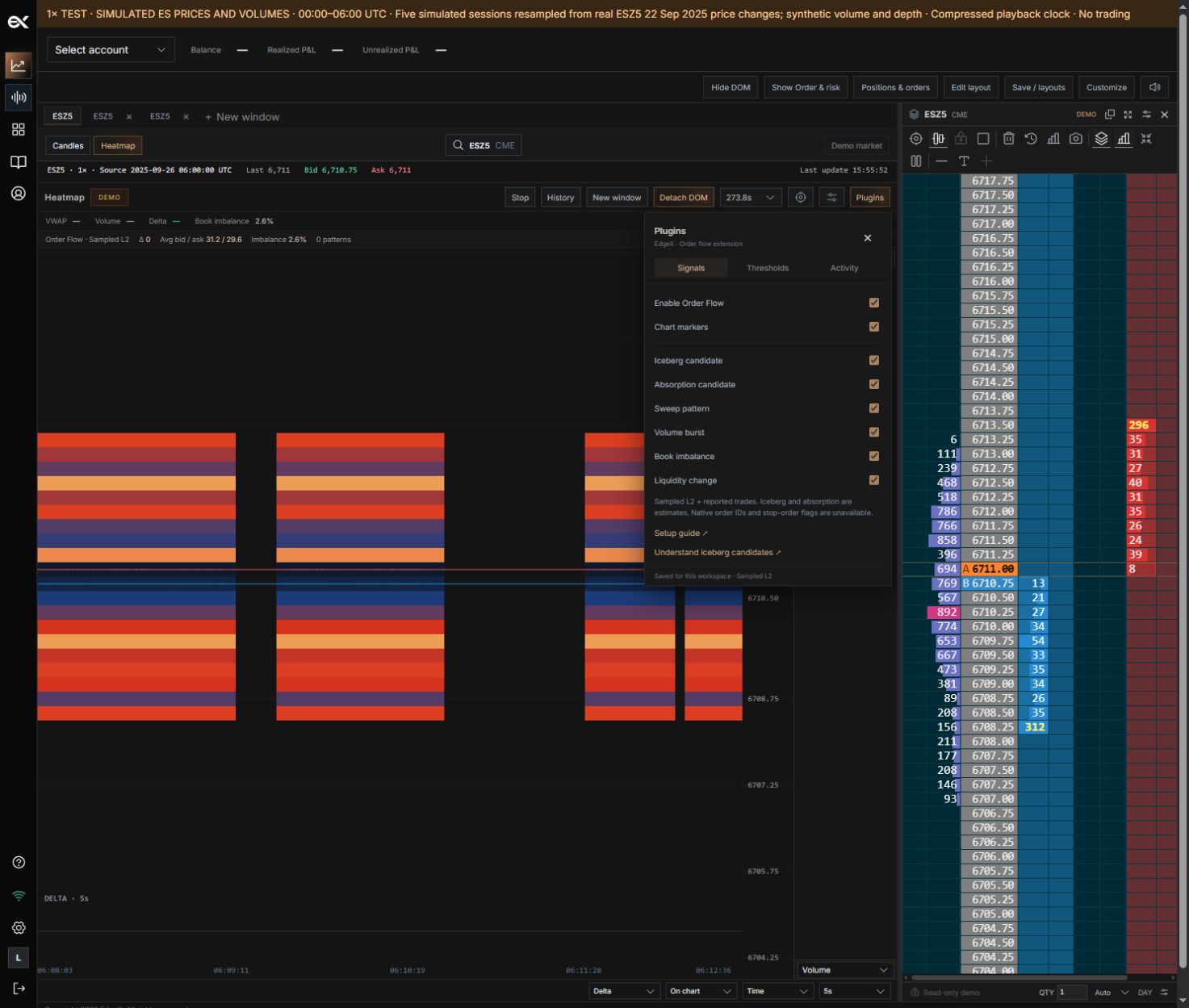
01Enable Order Flow
What it does
Enable the extension calculations.
How to use it
Wait for a complete observation window.
02Chart markers
What it does
Show detected candidates on the heatmap.
How to use it
Turning markers off is different from disabling the extension.
03Iceberg candidate
What it does
Detect replenishment alongside executions.
How to use it
This is inferred activity, not proof of a hidden order.
04Absorption candidate
What it does
Detect size executing within a constrained price span.
How to use it
Adjust window, volume and span together.
05Sweep pattern
What it does
Detect progressing executions across prices.
How to use it
Requires the configured span and directional progression.
06Volume burst
What it does
Detect an execution-volume event above the threshold.
How to use it
Tune thresholds to the instrument.
07Book imbalance
What it does
Compare available bid and ask depth quantities.
How to use it
Positive means more displayed bid liquidity.
08Liquidity change
What it does
Compare quantities at matched prices in consecutive snapshots.
How to use it
Not a pure cancellation counter; executions can reduce depth too.
09Window / Minimum volume
What it does
Set observation duration and directional volume floor.
How to use it
Long windows can combine unrelated trades.
10Refill samples / Executed–visible ratio
What it does
Tune the iceberg-candidate evidence requirements.
How to use it
Raise thresholds for fewer candidates.
11Activity
What it does
Inspect price, time, side and measured evidence.
How to use it
Selecting an observation centers its price.
12Setup guide
What it does
Open the matching Help Center guide.
How to use it
Review data-quality limitations before interpreting signals.
Open plugin settings
Open Plugins beside the heatmap controls. Signals enables individual detectors; Activity lists observations and evidence. Heatmap appearance remains in Heatmap settings.
Calibrate the detectors
Iceberg candidates compare repeated liquidity replenishment with executions. Absorption candidates compare executed volume with limited price movement. Sweeps look for directional executions across levels. Volume bursts compare size with configured thresholds. Book imbalance compares available bid and ask quantities.
Data quality and limitations
Candidate signals are inferences from captured data. They do not prove hidden order identity or intent. Sampled depth can miss intermediate events. After a feed gap, wait for a complete observation window before comparing patterns. Use the calibration and data-quality guides in this collection for detector-specific rules.
Still need a hand?
Get in touch with the EdgeX team.