READ THE SYMBOL / CONTRACT REFERENCE
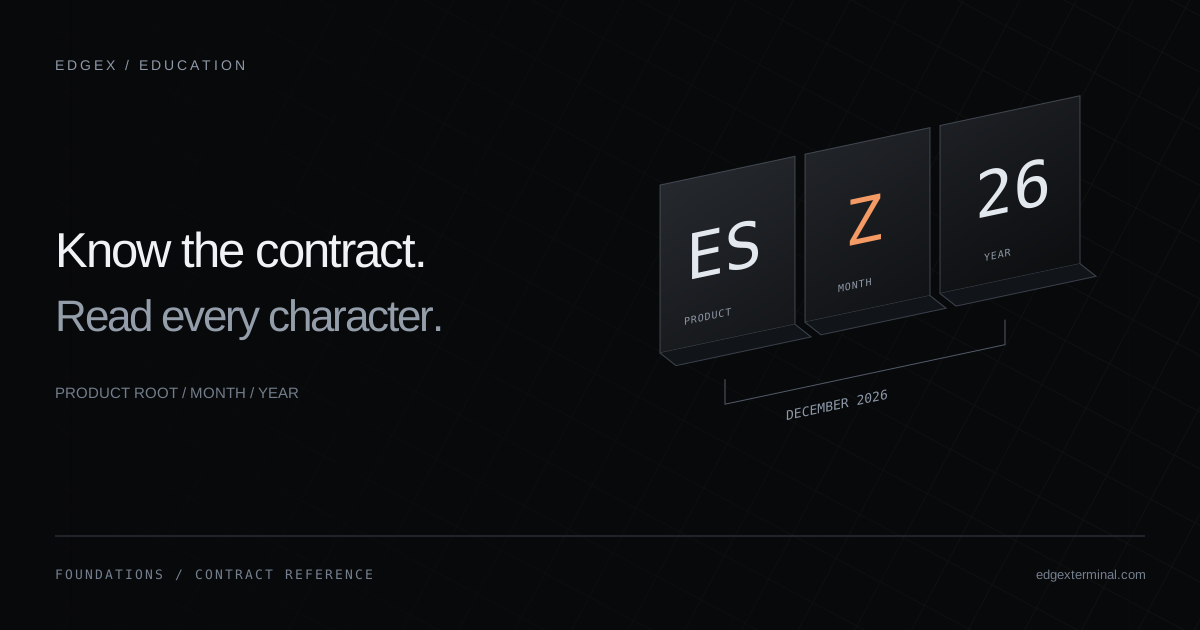
One code. Three parts.
A product root identifies the market. A month letter and year identify a dated contract.
ESZ61-digit yearESZ262-digit year
Format examples only. Listed months and display conventions vary by product and provider. A generated code does not confirm a tradable contract.
MES / December
Micro E-mini S&P 500 futures
Year suffix 26 · confirm the full year in your contract selector.
A single digit repeats every decade: “6” alone cannot distinguish 2026 from 2036. This tool reads notation; it does not check listing or expiry status.
The essentials
- The root identifies the product; a dated symbol adds a month and year.
- The month code is not an exact last-trading date.
- One-digit years need decade context, and provider display formats can differ.
- A valid-looking code does not prove that the contract is listed or available in your account.
Read the three components
Start with the product root, then read the month letter and the numeric year suffix. ES identifies E-mini S&P 500 futures; MES identifies the Micro E-mini product. Keep those roots distinct when selecting a contract.
Display conventions depend on the platform and data provider. This guide uses compact examples to explain the notation, rather than prescribing one format for every connection.
Reference: CME: understanding contract trading codes
All twelve contract month codes
Use this reference to translate the month letter. The sequence is fixed, but a product need not offer a contract for every month.
| Month | Code |
|---|---|
| January | F |
| February | G |
| March | H |
| April | J |
| May | K |
| June | M |
| July | N |
| August | Q |
| September | U |
| October | V |
| November | X |
| December | Z |
Reference: CME: contract month codes
Read year suffixes without guessing the decade
For a known 2026 contract, common displays may use 6 or 26; another interface may spell out 2026. A lone 6 is not enough to choose between 2026 and 2036. Read the full contract description and maturity date in the provider’s instrument selector.
The EdgeX reference decoder deliberately keeps a short year suffix as entered. It does not assign a decade or claim that the resulting contract can be traded.
| Illustrative notation | What to check |
|---|---|
| ESZ6 | December ES; verify the decade in the instrument listing. |
| ESZ26 | December ES with suffix 26; verify the full year. |
| ESH2027 | March ES with explicit year 2027, if this display form is supported. |
| MCLF27 | January Micro WTI with year suffix 27. |
A root is a product, not a selected expiry
Searching for NQ can return several dated contracts. Treat each result as a separate instrument choice. In your workspace notes, record the complete label you selected, not just the familiar root.
Try a simple consistency check: write the full contract at the top of your notes, then compare the labels on the chart, ladder and execution view. Resolve a mismatch before comparing observations. This is a workflow exercise; it does not require placing an order.
- Search the Symbol Table by product name or root.
- A compact dated search such as MESZ26 resolves to MES in the directory.
- Use the contract selector on your connected platform to confirm an actual listed expiry.
- Keep the same contract and observation interval across panels.
Contract cycles are product-specific
Micro E-mini equity-index contracts follow the March, June, September and December quarterly cycle. Other product families have different listing schedules. Do not infer a schedule simply because a root and month can be combined in the example builder.
When you examine a new market, open its contract specifications and record the listed months. Keep that reference with your workspace notes so that choosing a month becomes a deliberate step.
Contract month and last trading day are different
A month letter gives a contract month, not a complete calendar deadline. Check the product’s last trading day, settlement and, where applicable, delivery-related dates. The CME expiration calendar can be filtered by product and event type.
Record the event name, full date and timezone alongside the contract in your research notes. If your broker has an earlier handling deadline, that also belongs in your checklist.
Reference: CME: expiration calendar
Understand what a rollover changes
Rolling a position involves moving exposure from one dated contract to a later one. Changing the symbol shown on a chart is not itself a position rollover. Keep the display choice and any order or position action separate in your records.
During review, note which expiry supplied the prices and volume you observed. If you change contracts during a session, mark the transition in your notes so that later comparisons have a clear boundary.
Reference: CME: futures expiration and contract roll
Practice: decode, verify, document
Use the interactive reference above to change one component at a time. First compare ES and MES while keeping the month and year constant. Next change Z to H. Finally compare a one-digit and two-digit year display. Describe what changed before looking at a chart.
Build a small reference sheet with four columns: root, full provider label, contract month/year and source checked. Include one equity-index, energy and metals product from the directory. Leave any unverified field blank instead of assuming it.
Return to the same sheet when you build a workspace. The aim is a repeatable selection process and a clear record of which instrument you studied.
Common questions
Can I trade every code the builder produces?
No. It illustrates notation only. Listing cycles, available years, provider syntax and account access must be verified separately.
Does Z mean the final trading day is in December?
Z identifies the December contract month. Use the product specifications and expiry calendar for the actual last-trading date.
Why does searching MESZ26 show MES?
The directory contains product roots. A recognized dated search resolves to its root; it is not a live contract lookup.
Are all CME Group products included here?
The Symbol Table currently contains 223 futures roots from the public PRIIPs reference. It is a documented subset, not the full product slate.
Continue with the EdgeX product guides
These guides document the controls and data behavior used in this article.
Published by EdgeX Terminal, operated by EdgeProp Trading S.R.L. Product explanations are based on the EdgeX Help Center; external references are linked beside the relevant discussion. Examples are illustrative, not actual trading results. Futures trading involves risk; this material is education, not an individual trading recommendation.
Suggest a correction