
Order-flow indicators and large-trade bubbles
Delta, VWAP, profiles and execution-size markers.
Buttons & settings
Chart settings → Order flow / Indicators
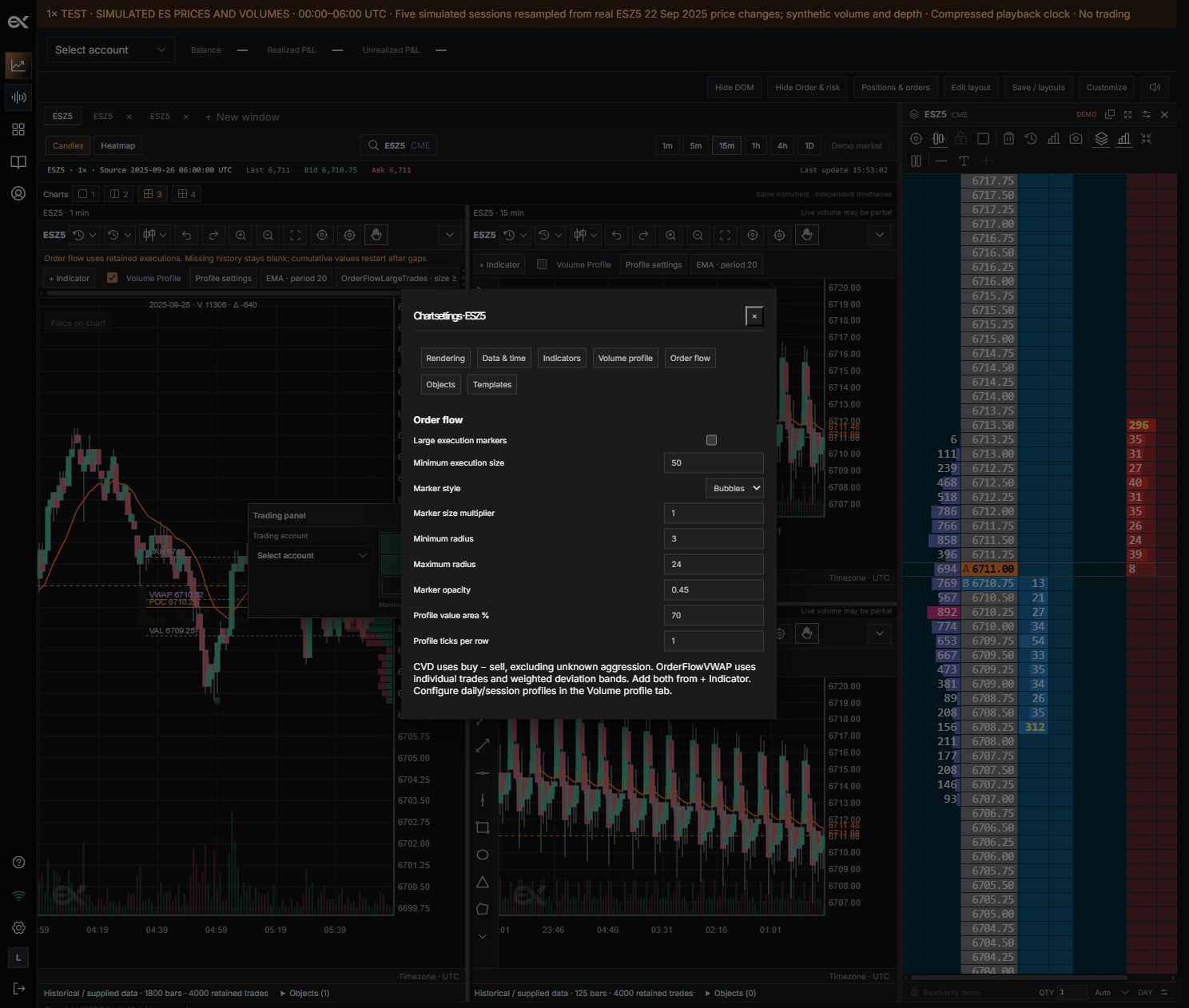
01Large execution markers
What it does
Enable bubbles anchored to execution time and price.
How to use it
Alternatively add the Large Trades indicator.
02Minimum execution size
What it does
Exclude executions below the size threshold.
How to use it
Set according to the contract, not a universal preset.
03Marker style
What it does
Choose Bubbles, Flat 2D or Outline.
How to use it
All use the same qualifying executions.
04Size multiplier / min–max radius
What it does
Control volume-based marker sizes and bounds.
How to use it
Capped markers do not imply identical trade size.
05Marker opacity
What it does
Control transparency.
How to use it
Lower to keep candles visible behind bubbles.
06Cumulative delta
What it does
Accumulate classified buys minus sells.
How to use it
Unknown aggression is excluded; gaps limit coverage.
07Order Flow VWAP
What it does
Calculate execution-weighted price and deviation bands.
How to use it
Select its reset scope in the indicator parameters.
Large Trades
Enable Large Trades in Indicators or large execution markers in Chart settings → Order flow. Set a minimum size, marker size, opacity and appearance. Bubbles stay anchored to execution time and price; larger qualifying executions receive larger markers within the configured bounds.
Delta and VWAP
Aggressor delta is buy-classified volume minus sell-classified volume; unknown direction is not silently classified. VWAP is the sum of price × execution size divided by total size for the indicator scope. Its reset and session settings matter.
Volume profile
Enable Volume Profile on the chart and adjust profile ticks per row and value-area percentage in Chart settings → Volume profile. Profile groups captured volume at price. Its visible-range coverage can differ from the full session. The volume overlay uses a transparent background so candles remain visible.
Still need a hand?
Get in touch with the EdgeX team.